Audit Log Filter overview
The Audit Log Filter component records, audits, and can block matching connections or statements on the server you configure.
With the component enabled, the server writes an audit log file that captures who connected, which statements ran, and which schemas sessions touched.
Architecture
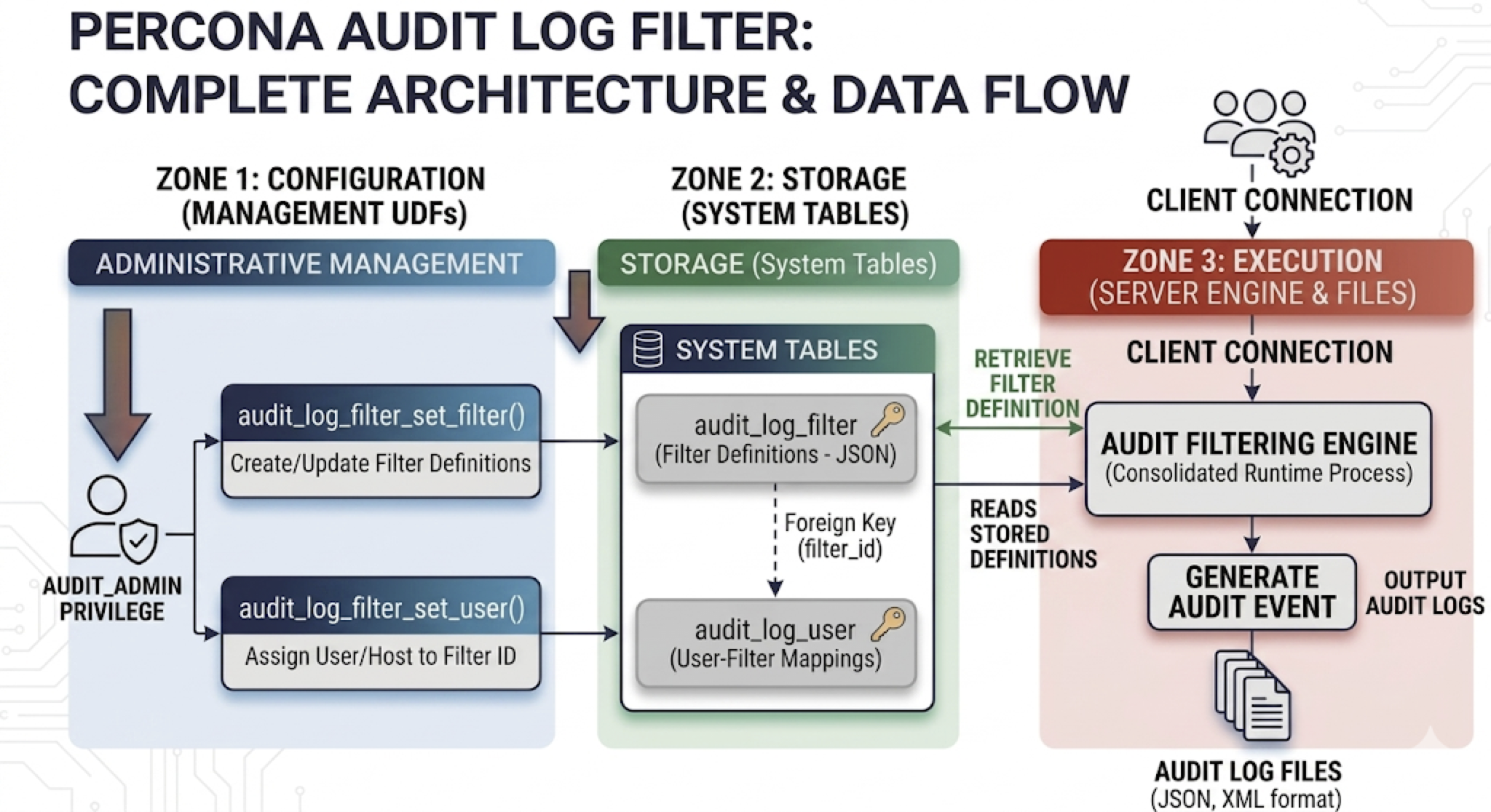
The following diagram shows how the Audit Log Filter component sits between the server core, your filter rules, and audit output.
Why the filter component
The component replaces the legacy audit log plugin. The design centers on three goals that the plugin could not meet:
-
Change rules without restarting the server. Filter definitions and account assignments live in
mysqlsystem tables. Updates viaaudit_log_filter_set_filter()andaudit_log_filter_set_user()take effect on new sessions (and reloads) without bouncing the server. The legacy plugin requiredaudit_log_*system-variable changes that often meant a restart or plugin reinstall to adjust scope. -
Scope audits per account, not globally. Each row in
mysql.audit_log_userbinds a user or user-pattern to a named filter, soadmin@%andapp@%can be audited differently on the same instance. The legacy plugin offered only global include/exclude lists (audit_log_include_accounts/audit_log_exclude_accounts) on top of a single policy preset. -
Express rules as data, not as knob settings. Filter definitions are JSON documents. A rule can match an event, a class, a subclass, or a specific field value; combine matches with
and/or/not; call predefined variables and functions; block execution withabort; and redact statement text in place withprint/replace. The legacy plugin had policy presets (LOGINS,QUERIES,ALL, …) with far coarser control and no blocking or redaction.
A secondary benefit falls out of the design: events that a filter drops never reach the formatter or the writer, so the cost of “audit everything, then throw most of it away” is avoided at the source. Combined with per-account scoping, this lets operators raise audit detail on sensitive accounts without paying for verbose logging elsewhere.
See Write audit_log_filter definitions for the JSON grammar, Block statements with an audit log filter for abort, and Redact audit log fields for print / replace.
Audit data flow
The following diagram traces audit events from the server through filtering and formatting into the log (file, syslog, or another handler).
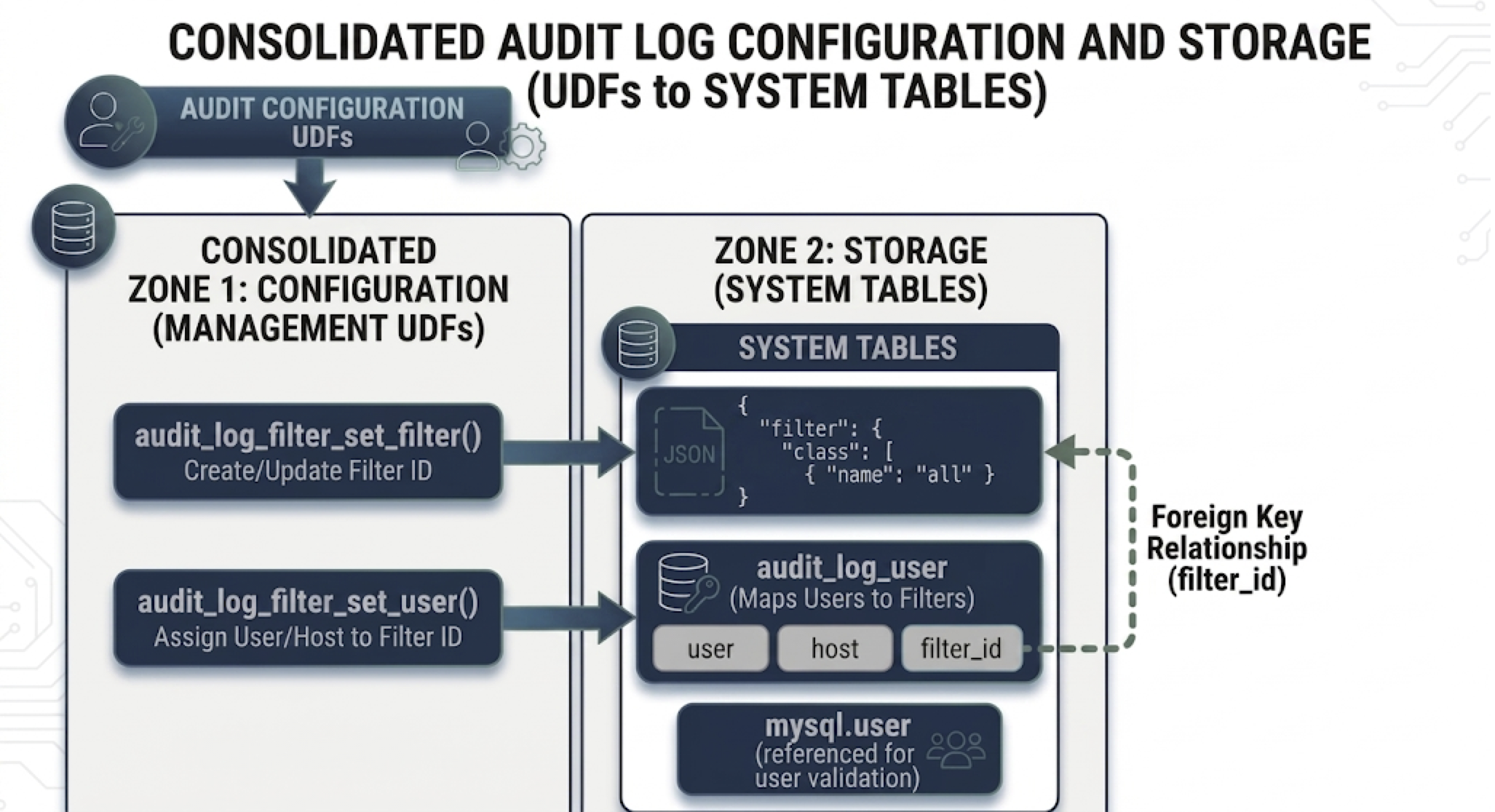
Set audit_log_filter.format at startup. Audit Log Filter file format overview compares NEW (the default in Percona Server 8.4), OLD, JSON, and JSONL.
audit_log_filter.event_mode selects which event classes the component audits (default REDUCED; FULL enables every class the component supports, including beyond the four core classes). That reference lists full class sets, validation rules, and behavior on older releases.
The component stores filter definitions and account assignments in the mysql system database. Set audit_log_filter.database at startup to use a different database.
You need AUDIT_ADMIN to administer the Audit Log Filter component.
Privileges
Define the privilege at server startup. If the component is not loaded, the server does not expose the Audit Log Filter privilege.
AUDIT_ADMIN
The server defines AUDIT_ADMIN so grantees can configure the component.
AUDIT_ABORT_EXEMPT
A filter may include an abort rule that blocks matching statements. To bypass those aborts, an account needs both SYSTEM_USER and the global AUDIT_ABORT_EXEMPT privilege (granted on *.*).
Only that pair lets matching statements run when a filter would otherwise abort them. The component still writes those statements to the audit log.
Audit Log Filter tables
The Audit Log Filter component uses mysql system tables on InnoDB. They hold account assignments and filter JSON. Point the component at another database with audit_log_filter.database when the server starts.
The audit_log_filter table stores named filter definitions:
| Column name | Description |
|---|---|
| NAME | Filter name |
| FILTER | JSON filter definition linked to that name |
The audit_log_user table maps accounts to filters:
| Column name | Description |
|---|---|
| USER | MySQL account user part |
| HOST | MySQL account host part |
| FILTERNAME | Name of the assigned filter |
Filter storage hierarchy
The following diagram shows how rows in audit_log_filter map to audit_log_user, including the default % account.
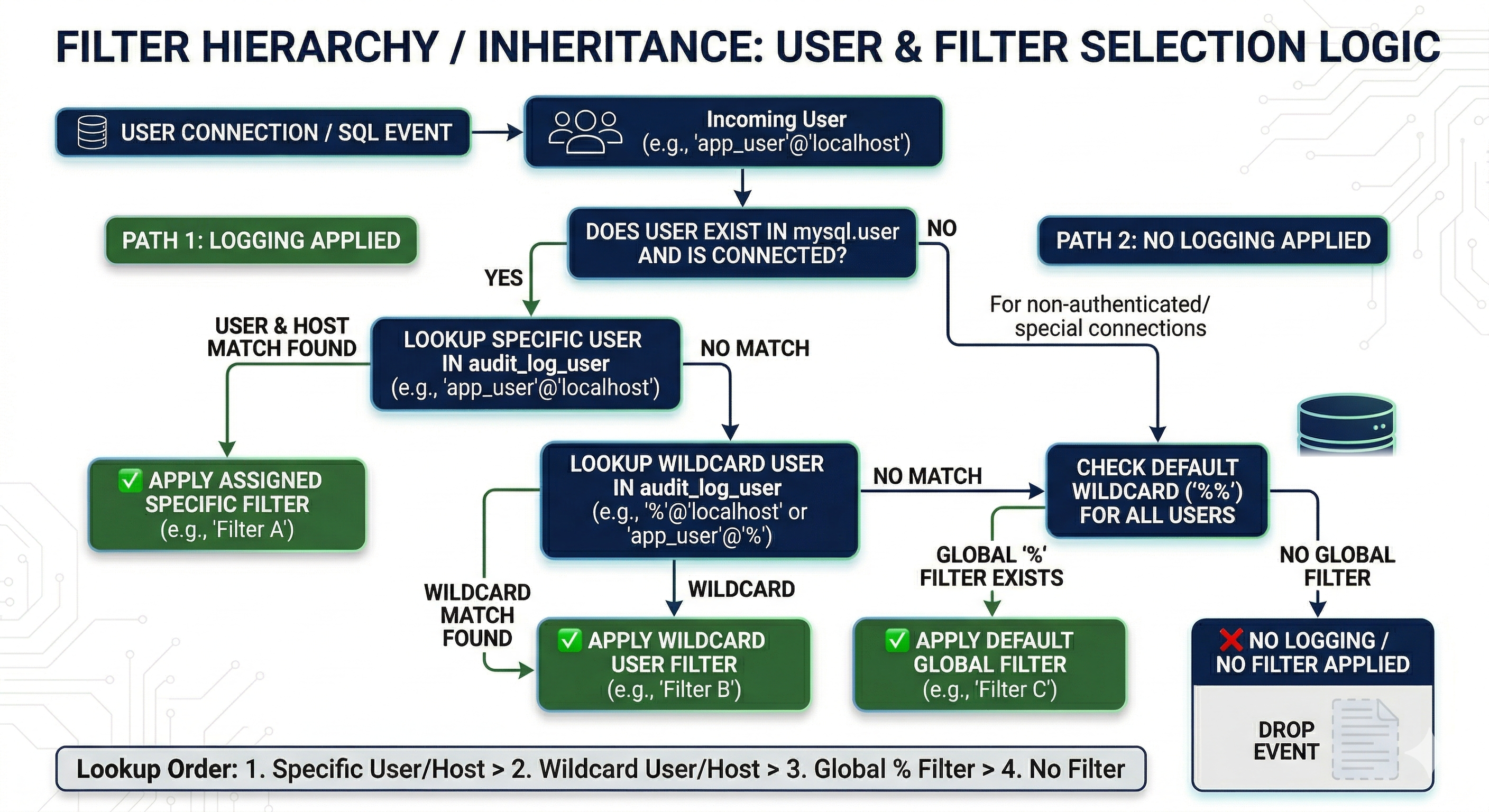
On connect, the component loads one filter definition from the matching USER/HOST row in mysql.audit_log_user, or falls back to the default account (%). A concrete account (for example admin@localhost) overrides a % assignment. Rules inside that filter’s JSON (for example log conditions that test user.str or host.str with field items) apply after load — they narrow which events get written, but do not act as a second assigned filter. See Filter the Audit Log Filter logs for assignment order and wildcards, and Write audit_log_filter definitions for the JSON grammar that log conditions use.
Additional reading
- Install the audit log filter
- Audit Log Filter quickstart
- Audit log filter functions, options, and variables
- Write audit_log_filter definitions
- Filter the Audit Log Filter logs
- Audit Log Filter file format overview
- Migrate to the audit log filter component — coming from either audit plugin: variable mapping, policy translation, worked example, cutover
- Upgrade components — general plugin-to-component transition procedure
- Audit log plugin — deprecated plugin reference